
How to Make Changes to an Active Order
At CaterSpot, we understand that sometimes plans change, and you may need to update your order. Here’s are ways you can make changes:
Request the change from our support team:
If you’re unable to update the order yourself, our support team can help submit a change request for you via live chat or email.
To help us assist you quickly, please be ready to share:
-
Your order number or order code
-
Your delivery date and time
-
What you’d like to change (e.g. number of pax, items, delivery time, address)
-
The exact change requested (from → to)
Please note that all changes are subject to vendor notice periods and confirmation.
Make Changes yourself:
1. Check the Update Order Option
If the vendor’s notice period has not yet passed, you will see the Update Order button next to your active order.
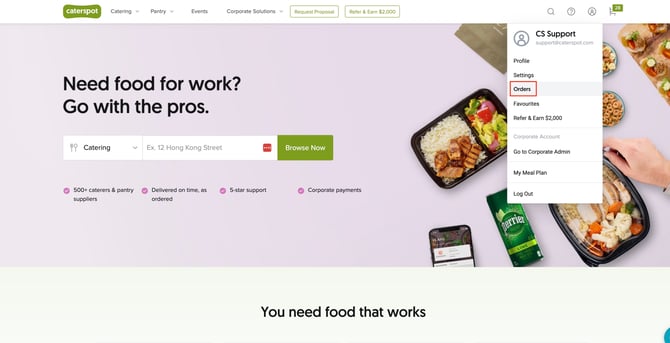
1.Log into your account: Once logged in, click on Orders from the menu.
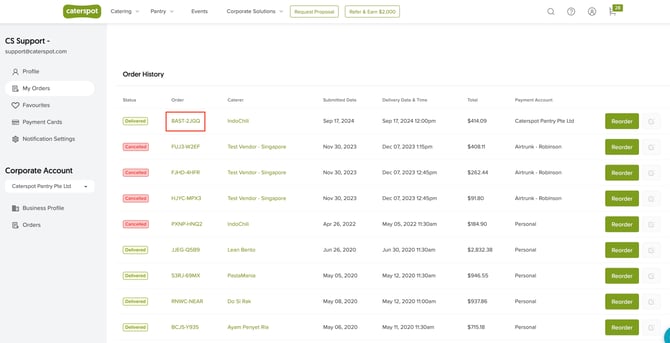
 2.Select the order you wish to modify: Find the order you want to edit from the list of active orders and click on it.
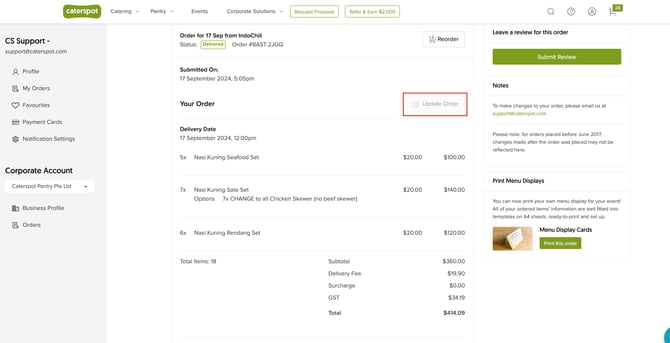
 3.Click Update Order: If the vendor’s notice period allows, this option will be active, and you can proceed to modify your order.
2. What if the Update Order Button is Disabled?
If the vendor’s notice period has passed, the Update Order button will be disabled, and you won’t be able to make changes directly through the platform.
• Contact CaterSpot Support: If the button is not active, you can still reach out to our support team at support@caterspot.com.
• Note: While we will do our best to accommodate your changes, there is no guarantee that they can be made. Approval will depend on the vendor’s ability to adjust the order.
3. Important Considerations
•Vendor Discretion: Even if changes are requested through support, it is ultimately up to the vendor whether they can accommodate changes after the notice period.
•Time-Sensitive Orders: Ensure you check the vendor’s cutoff times for making changes. For some vendors, changes may not be possible within a certain window before the delivery time.
This guide ensures you know the process for modifying your order and what to expect if the order has already passed the vendor’s notice period.